System Operation Description:
Before testing of the ether injection system, remove the ether cylinder from the system.
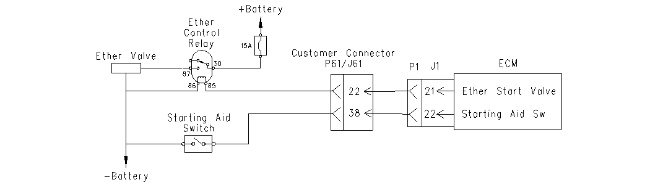
The ether injection system will improve cold weather starting of the engine. The Electronic Control Module (ECM) controls the ether injection system. The ether injection system has two operating modes. The ether injection system can operate in automatic mode and in manual mode. The engine oil temperature and the engine speed are used to determine ether injection. The ether injection system is disabled if there is an active engine shutdown.
In the automatic mode, the ether injection system is enabled when all of the following conditions occur:
- Ether is programmed to the ON position in the configuration screen.
- Inlet air temperature is less than 0 °C (32 °F).
- Engine speed is less than 200 rpm above the low idle speed.
In the automatic mode, the ECM energizes the relay for the ether in cycles of six seconds. The ether is turned ON for three seconds. The ether is then turned OFF for three seconds.
Manual mode is activated by pressing the starting aid switch. In the manual mode, the ether injection system is enabled when all of the following conditions are met:
- The starting aid switch is placed in the MANUAL position.
- Inlet air temperature is less than 0 °C (32 °F).
- Engine speed is less than 200 rpm above the low idle speed.
In manual mode, ether injection is disabled if engine speed is greater than 200 rpm above the low idle speed.
|
|
|
|
|
|
| Illustration 1 | g00751022 |
|
Schematic for ether injection system |
|
 |
|
Breathing ether vapors or repeated contact of ether with skin can cause personal injury. Personal injury may occur from failure to adhere to the following procedures. Use ether only in well ventilated areas. Do not smoke while changing ether cylinders. Use ether with care to avoid fires. Do not store replacement ether cylinders in living areas or in the operator’s compartment. Do not store ether cylinders in direct sunlight or at temperatures above 49 °C (120 °F). Discard cylinders in a safe place. Do not puncture or burn cylinders. Keep ether cylinders out of the reach of unauthorized personnel. To avoid possible injury, be sure the brakes are applied and all controls are in Hold or Neutral when starting the engine. |
 |
Test Step 1. Verify the Status of the Ether Injection System
Verify that the ether injection system has been programmed to ON.
Results:
- OK – The ether injection system has been programmed to ON. Proceed to Test Step 2.
- Not OK – The ether injection system has not been programmed to ON. Program the ether injection system to ON. Verify that all of the conditions are met in order for the ether injection system to function properly. Proceed to Test Step 2.
Test Step 2. Inspect Electrical Connectors and Wiring
- Turn the keyswitch to the OFF/RESET position.
- Thoroughly inspect ECM connector J1/P1, customer connector J61/P61, and all other connectors in the wiring harness. Refer to Troubleshooting, “Electrical Connectors – Inspect” for details.
- Inspect the following components for damage, for corrosion, and for incorrect attachment:
- Battery posts
- Alternator
- Breaker
- Engine ground
- Chassis ground
Expected Result:
All connectors, pins, and sockets are completely inserted and coupled. The harness and wiring are free of corrosion, of abrasion, and of pinch points. All connections and grounds are tight and free of corrosion.
Results:
- OK – The harness and wiring are OK. Proceed to Test Step 3.
- Not OK – There is a problem with the harness and/or wiring.
Repair: Repair the circuit.Verify that the repair eliminates the problem.
STOP
Test Step 3. Check the Switch Circuit at the J61/P61 Customer Connector
| Pin Locations for Switch | ||
| Name of Switch | J61 Connection | J1 Connection |
| Starting Aid Override Switch | 38 | 22 |
|
|
|
|
|
|
| Illustration 2 | g00762294 |
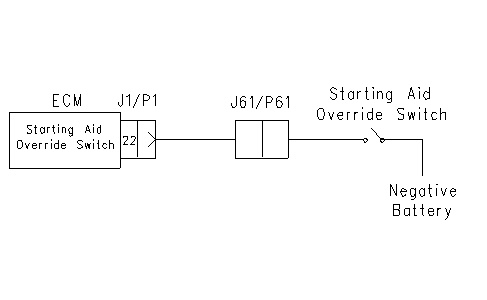
- Disconnect the J61 Customer Connector.
- Connect one end of the voltage test lamp to J61-38 and connect the other end of the voltage test lamp to P61-38. Refer to illustration 2 for details.
- Turn the keyswitch to the ON position.
- Operate the starting aid override switch and observe the voltage test lamp.
Expected Result:
The voltage test lamp should turn on when the switch is closed. The voltage test lamp should turn off when the switch is opened.
Results:
- OK – The voltage test lamp turned on when the switch was closed. The voltage test lamp turned off when the switch was opened. The switch is operating correctly. Proceed to Test Step 4.
- Not OK – The voltage test lamp failed to function according to the expected results.
Repair: Repair the connectors or wiring and/or replace the connectors or wiring. Ensure that all of the seals are properly in place and ensure that the connectors are completely coupled.Verify that the repair eliminates the problem.
STOP
Test Step 4. Check the Switch Circuit at the J1/P1 ECM Connector
- Reconnect the J61 Customer Connector.
- Disconnect the J1 ECM Connector.
- Connect one end of the voltage test lamp to J1-22 and connect the other end of the voltage test lamp to P61-22. Refer to illustration 2 for details.
- Turn the keyswitch to the ON position. The engine should be OFF.
- Operate the starting aid override switch and observe the voltage test lamp.
Expected Result:
The voltage test lamp should turn on when the switch is closed. The voltage test lamp should turn off when the switch is opened.
Results:
- OK – The voltage test lamp turned on when the switch was closed. The voltage test lamp turned off when the switch was opened. The switch is operating correctly. Proceed to Test Step 5.
- Not OK – The voltage test lamp failed to function according to the expected results. There is a problem in the wiring.
Repair: Repair the wiring and/or replace the wiring. Verify that the repair eliminates the problem.
STOP
Test Step 5. Test the Ether Start Relay
- Turn the keyswitch to the OFF/RESET position.
- Connect the test lamp between the terminals of the ether start relay.
- Turn the keyswitch to the ON position.
- Activate the starting aid override switch.
Expected Result:
The test lamp should turn on for three seconds.
Results:
- OK – The test lamp turned on for three seconds. Proceed to Test Step 6.
- Not OK – The test lamp did not turn on for three seconds. Proceed to Test Step 7.
Test Step 6. Test the Voltage at the Ether Valve
- Turn the keyswitch to the OFF/RESET position.
- Disconnect the wires from the ether valve.
- Connect the voltage test lamp between the wires that were removed from the ether valve.
- Turn the keyswitch to the ON position and start the engine.
- Activate the starting aid override switch.
Expected Result:
The voltage test lamp should turn on for three seconds.
Results:
- OK – The voltage test lamp turned on for three seconds.
Repair: Temporarily install a new ether valve. Verify that the problem no longer exists. Reinstall the old ether valve. If the problem reoccurs, replace the old ether valve.Verify that the repair eliminates the problem.
STOP
- Not OK – The voltage test lamp did not turn on for three seconds. There is a problem in the wiring between the ether valve and the ether start relay.
Repair: Repair the connectors or wiring and/or replace the connectors and wiring.
STOP
Test Step 7. Test the Voltage at the Ether Start Relay
- Turn the keyswitch to the OFF/RESET position.
- Disconnect the wires from the ether start relay.
- Connect the voltage test lamp between the drive line wire for the ether start relay and the negative battery.
- Turn the keyswitch to the ON position and start the engine.
- Activate the starting aid override switch.
Expected Result:
The voltage test lamp should turn on for three seconds.
Results:
- OK – The voltage test lamp turned on for three seconds. Proceed to Test Step 9.
- Not OK – The voltage test lamp did not turn on for three seconds. Proceed to Test Step 8.
Test Step 8. Check the Circuit for the Ether Injection System
- Turn the keyswitch to the OFF/RESET position.
- Remove J1-21 from ECM Connector J1.
- Install one end of a jumper wire into the socket for J1-21.
- Connect one lead of the voltage test lamp to the other end of the jumper wire.
- Connect the other lead of the voltage test lamp to negative battery.
- Turn the keyswitch to the ON position and start the engine.
- Activate the starting aid override switch.
Expected Result:
The voltage test lamp should turn on for three seconds.
Results:
- OK – The voltage test lamp turned ON for three seconds. There is a problem in the wiring between J1 and the ether start relay.
Repair: Repair the connectors or wiring and/or replace the connectors and wiring.
STOP
- Not OK – The voltage test lamp did not turn on for three seconds.
Repair: Perform the following diagnostic procedure.
- Temporarily connect a test ECM.
- Remove all jumpers and reconnect all connectors.
- Recheck the system for active diagnostic codes.
- Repeat the test step.
- If the problem is resolved with the test ECM, reconnect the suspect ECM.
- If the problem returns with the suspect ECM, replace the ECM.
- Verify that the repair eliminates the problem.
STOP
Test Step 9. Test the Diode for Current Flow in One Direction
|
|
|
|
|
|
| Illustration 3 | g00761537 |
- Disconnect the wires from the air shutoff relay.
- Remove the diode from the air shutoff relay.
- Put the Digital Voltmeter (DVM) in “Diode Check”.
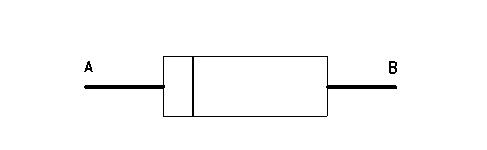
- Place the red lead of the DVM on the diode at location (A). Place the black lead of the DVM on the diode at location (B). Refer to illustration 3 for locations.
- Measure the voltage drop across the diode.
Expected Result:
The voltage drop across the diode should be greater than 1.0 volt.
Results:
- OK – The voltage drop across the diode is greater than 1.0 volt. Proceed to Test Step 10.
- Not OK – The voltage drop across the diode is less than 1.0 volt.
Repair: Replace the diode. Verify that the repair eliminates the problem.
STOP
Test Step 10. Test the Diode for Current Flow in Opposite Direction
- Place the red lead of the DVM on the diode at location (B). Place the black lead of the DVM on the diode at location (A). Refer to illustration 3 for locations.
- Measure the voltage drop across the diode.
Expected Result:
The voltage drop across the diode should be less than 1.0 volt.
Results:
- OK – The voltage drop across the diode is less than 1.0 volt. Proceed to Test Step 11.
- Not OK – The voltage drop across the diode is not less than 1.0 volt.
Repair: Replace the diode. Verify that the repair eliminates the problem.
STOP
Test Step 11. Install a Test ECM
- Temporarily connect a test ECM.
- Remove all jumpers and reconnect all connectors.
- Recheck the system for active diagnostic codes.
- Repeat the test step.
- If the problem is resolved with the test ECM, reconnect the suspect ECM.
- If the problem returns with the suspect ECM, replace the ECM.
Results:
- OK – STOP