System Operation Description:
| Parameter | Alternative | Default |
| “PTO mode” | “PTO mode 2” | “PTO mode 1” |
| “Engine accel. rate” | 50 to 1000 rpm/sec | 50 rpm/sec |
PTO Mode 1
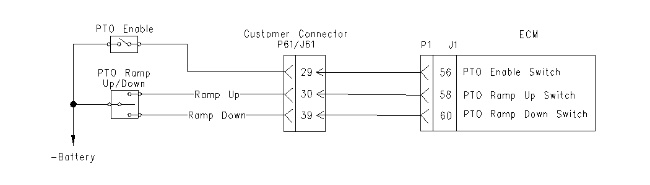
PTO mode 1 uses the following switch inputs:
- “PTO Enable”
- “Ramp Up”
- “Ramp Down”
If the PTO enable switch is in the ON position, the throttle position sensor is disabled and the desired engine speed is controlled by the PTO ramp up/down switch. The ramp up input and the ramp down input cannot be connected to the -Battery at the same time. If this occurs, the Electronic Control Module (ECM) will generate a diagnostic code and the ECM will make no adjustments to the desired engine speed when the unit is in the PTO mode.
Note: The ECM will use the selected speed that is higher when the ECM chooses between the throttle input or the PTO input. When the switch is toggled, the engine will respond according to the PTO rpm ramp rate that is programmed. When the switch is opened, the engine will maintain the current desired engine rpm. “Opened” in this case means that the switch is in the center position.
PTO Mode 2
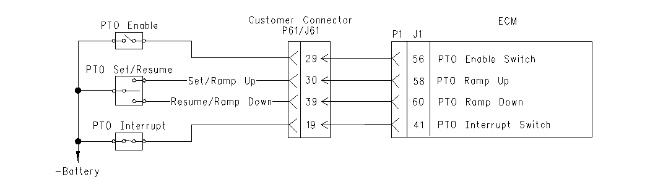
PTO mode 2 uses the following switch inputs:
- “PTO Enable”
- “Set (Ramp up)”
- “Resume (Ramp down)”
- “PTO Interrupt”
“Set (ramp up)”
- If the input is momentarily connected to -Battery, the desired engine speed will be set to the current engine speed.
- If the input is connected to -Battery and held in that position, the desired engine speed will increase at the PTO ramp rate that is programmed.
- If this input is connected momentarily to -Battery and after the desired engine speed has been set, the desired engine speed will increase by 20 rpm.
“Resume (ramp down)”
- If this input is momentarily connected to -Battery, the desired engine speed will be set to the last known value that was used during operation of the PTO.
- If this input is connected to -Battery and held in that position, the desired engine speed will decrease at the rate that is programmed for “Engine Accel. Rate”.
- After the desired engine speed is set, momentarily connecting this input to -Battery will decrease the engine speed in increments of 20 rpm.
|
|
|
|
|
|
| Illustration 1 | g00751867 |
|
Schematic for PTO switches in PTO mode 1 “Ramp Up/Ramp Down” |
|
|
|
|
|
|
|
| Illustration 2 | g00751903 |
|
Schematic for PTO switches in PTO mode 2 “Set/Resume” |
|
|
|
|
|
|
|
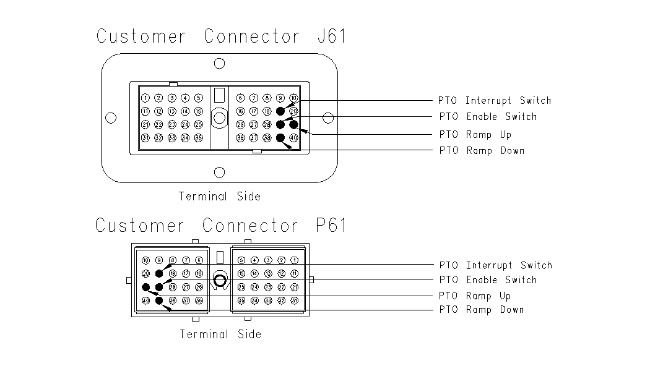
| Illustration 3 | g00743407 |
|
Terminal locations for customer connector |
|
|
|
|
|
|
|
| Illustration 4 | g00743410 |
|
Terminal locations for ECM connector |
|

Test Step 1. Check the Electrical Connectors and the Wiring
- Place the engine control in the OFF/RESET mode and thoroughly inspect the J61/P61 customer connector, and J1/P1 ECM connector. Refer to Troubleshooting, “Electrical Connectors – Inspect” for details.
- Perform a 45 N (10 lb) pull test on each of the wires in the customer connector and the ECM connector that are associated with the suspect switch circuits.
- Check the J61/P61 customer connector (allen head screw) for the proper torque. Refer to Troubleshooting, “Electrical Connectors – Inspect” for details.
Check the ECM connector J1/P1 for the proper torque. Refer to Troubleshooting, “Electrical Connectors – Inspect” for details.
- Check the harness and wiring for abrasions and for pinch points from the battery to the ECM.
Expected Result:
All connectors, pins, and sockets are completely coupled and/or inserted, and the harness and wiring are free of corrosion, of abrasion and of pinch points.
Results:
- OK – The connectors and wiring are OK. Proceed to Test Step 2.
- Not OK – There is a problem with the connectors and/or wiring.
Repair: Repair the wiring and connectors or replace the wiring or the connectors. Ensure that all of the seals are properly connected. Verify that the repair eliminates the problem.
STOP
Test Step 2. Check the Switch Circuit at the J61/P61 Customer Connector
| Pin Locations for Switch | ||
| Name of Switch | J61 Connection | J1 Connection |
| PTO ramp up switch | 30 | 58 |
| PTO ramp down switch | 39 | 60 |
- Disconnect the J61 customer connector.
- Connect a voltage test lamp between the suspect switch circuit and the +Battery. Use Table 2 for pin locations. Also, refer to Illustration 1 for the schematic.
- Operate the suspect switch and observe the voltage test lamp.
Expected Result:
The voltage test lamp turns ON when the switch is closed. The voltage test lamp turns OFF when the switch is opened.
Results:
- OK – The switch is operating correctly. Proceed to Test Step 3.
- Not OK – There is a problem with the suspect switch and/or the wiring.
Repair: Repair the connectors or wiring and/or replace the connectors or wiring. Ensure that all of the seals are properly in place and ensure that the connectors are completely coupled.Verify that the repair eliminates the problem.
STOP
Test Step 3. Check the Switch Circuit at the J1/P1 ECM Connector
|
|
|
|
|
|
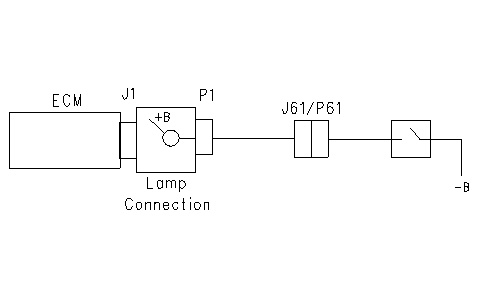
| Illustration 5 | g00762297 |
- Reconnect the J61 customer connector.
- Disconnect the P1 ECM connector.
- Connect a voltage test lamp between the suspect switch circuit and the +Battery. Use Table 2 for pin locations.
- Operate the suspect switch and observe the voltage test lamp.
Expected Result:
The voltage test lamp turns ON when the switch is closed. The voltage test lamp turns OFF when the switch is opened.
Results:
- OK – The switch circuit is operating correctly. The problem may be in the ECM.
Repair: Perform the following repair:
- Temporarily connect a test ECM.
- Remove all jumpers and reconnect all connectors.
- Recheck the system for active diagnostic codes.
- Repeat the test step.
- If the problem is resolved with the test ECM, reconnect the suspect ECM.
- If the problem returns with the suspect ECM, replace the ECM.
- Verify that the repair eliminates the problem.
STOP
- Not OK – There is a problem in the wiring between ECM connector P1 and the customer connector J61.
Repair: Repair the wiring and/or replace the wiring. Verify that the repair eliminates the problem.
STOP