System Operation Description:
Use this procedure to troubleshoot the electrical system if a problem is suspected with the sensor. Also use this procedure if any one of the diagnostic codes in Table 1 is active or easily repeated.
| Diagnostic Codes Table | |||
|---|---|---|---|
| CDL Code | J1939 Code | Code Description | Comments |
| 110-3 | 110-3 | Engine Coolant Temperature Sensor : Voltage Above Normal | The code is logged if the engine has been running for more than seven minutes and an open circuit has been detected. |
| 110-4 | 110-4 | Engine Coolant Temperature Sensor : Voltage Below Normal | The code is logged. The ECM detects voltage that is not in the acceptable range. |
| 174-3 | 174-3 | Fuel Temperature Sensor : Voltage Above Normal | The code is logged. The ECM will flag the fuel temperature as invalid data and the fuel temperature is set to a default value of 40 °C (104 °F). |
| 174-4 | 174-4 | Fuel Temperature Sensor : Voltage Below Normal | |
| 1836-3 | 1385-3 | Auxiliary Temperature Sensor : Voltage Above Normal | The code is logged. The ECM will flag the temperature as invalid data and the temperature is set to a default value. |
| 1836-4 | 1385-4 | Auxiliary Temperature Sensor : Voltage Below Normal | The code is logged. The ECM will flag the temperature as invalid data and the temperature is set to a default value. |
| 2526-3 | 172-3 | Air Inlet Temperature Sensor : Voltage Above Normal | The code is logged. The ECM detects voltage that is not in the acceptable range. |
| 2526-4 | 172-4 | Air Inlet Temperature Sensor : Voltage Below Normal | The code is logged. The ECM detects voltage that is not in the acceptable range. |
| 3372-3 | 2630-3 | Engine Charge Air Cooler #1 Outlet Temperature Sensor : Voltage Above Normal | The code is logged. The ECM detects voltage that is not in the acceptable range. |
| 3372-4 | 2630-4 | Engine Charge Air Cooler #1 Outlet Temperature Sensor : Voltage Below Normal | The code is logged. The ECM detects voltage that is not in the acceptable range. |
| 3386-3 | 412-3 | EGR Temperature Sensor : Voltage Above Normal | The code is logged. This code will not become active during Cold Mode. Run the engine to exit cold mode before troubleshooting a 3386-3 code. The ECM detects voltage that is not in the acceptable range. |
| 3386-4 | 412-4 | EGR Temperature Sensor : Voltage Below Normal | The code is logged. The ECM detects voltage that is not in the acceptable range. |
| 3683-3 | 442-3 | Auxiliary Temperature #2 : Voltage Above Normal | The code is logged. The ECM detects voltage that is not in the acceptable range. |
| 3683-4 | 442-4 | Auxiliary Temperature #2 : Voltage Below Normal | The code is logged. The ECM detects voltage that is not in the acceptable range. |
System Overview
The sensor signal for the passive sensor is routed from the ECM to terminal 1 of each sensor connector. The sensor return for the passive sensors is routed to the ECM from terminal 2 of each sensor connector.
Diagnostics on the Caterpillar Electronic Technician (ET)
Wiggle Test – The Wiggle Test allows you to monitor the status of the signals from the sensors.
For additional information regarding the Wiggle Test, refer to the documentation that accompanies the Cat ET software.
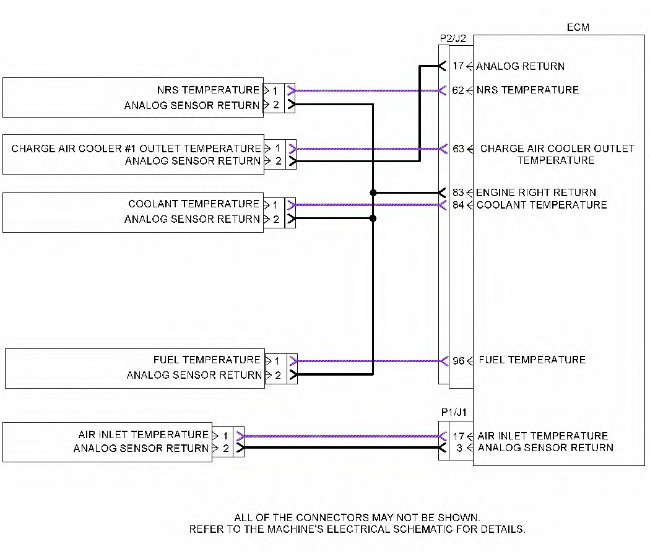
Illustration 1 g03330022
Schematic for the passive analog sensors
| Troubleshooting Test Steps | Values | Results |
| 1. Check for Diagnostic Trouble CodesA. Connect to Caterpillar Electronic Technician (ET).
B. Turn the keyswitch to the ON position. C. Access the “Active Diagnostic Code” screen on Cat ET. Wait at least 30 seconds in order for the diagnostic codes to become active. D. Look for these active codes or logged codes: 1. -3 2. -4 |
Codes | Result: A -3 diagnostic code is active.Proceed to Test Step 2.
Result: A -4 diagnostic code is active. Proceed to Test Step 3. Result: To troubleshoot a logged 3386-3 or a 412-3 diagnostic code during cold mode, Proceed to Test Step 5. Result: For a diagnostic code that is logged but not currently active, Proceed to Test Step 4. |
| 2. Create a Short at the Sensor ConnectorA. Turn the keyswitch to the OFF position.
B. Disconnect the suspect sensor. C. Install the jumper wire between terminal 1 (sensor signal) and terminal 2 (sensor return) at the sensor connector. D. Turn the keyswitch to the ON position. E. Monitor the diagnostic codes on Cat ET. Check for an active -4 diagnostic code for the suspect sensor. Wait at least 30 seconds in order for the diagnostic codes to become active. F. Turn the keyswitch to the OFF position. |
Short circuit recognized | Result: The -3 diagnostic code remains active for the suspect sensor.There is an open in the harness. Repair the wiring or replace the harness.
Verify that the problem is resolved. Result: A -4 diagnostic code became active after creating the short at the sensor connector. The wiring is OK. Replace the sensor. Verify that the problem is resolved. |
| 3. Create an Open at the Suspect Sensor ConnectorA. Turn the keyswitch to the OFF position.
B. Disconnect the sensor connector of the suspect sensor with the active -4 diagnostic code. C. Turn the keyswitch to the ON position. D. Monitor the diagnostic codes on Cat ET. Check for an active -3 diagnostic code for the suspect sensor. Wait at least 30 seconds in order for the diagnostic codes to become active. E. Turn the keyswitch to the OFF position. |
Open circuit recognized | Result: The -4 diagnostic code remains active for the suspect sensor.There is an open in the harness. Repair the wiring or replace the harness.
Verify that the problem is resolved. Result: A -3 diagnostic code became active after disconnecting the sensor. The wiring is OK. Replace the sensor. Verify that the problem is resolved. |
| 4. Perform the Wiggle TestCarefully following this procedure is the best way to identify the root cause of an intermittent problem.
A. Turn the keyswitch to the ON position. B. Use Cat ET to run the “Wiggle Test”. C. Slowly wiggle the wiring and the connectors between the P2 connector and the sensor. Slowly wiggle the wiring and the connectors between the P1 connector and the sensor. Pay particular attention to the wiring near each connector. Be sure to wiggle all of the wiring. D. As you wiggle the wiring look for these problems. 1. Loose connectors or damaged connectors |
Wiggle test | Result: The wiring failed the Wiggle Test.There is a problem with the wiring. Repair the wiring or replace the wiring.
Verify that the problem is resolved. Result: The wiring passed the Wiggle Test. The problem may be intermittent. Inspect the wiring. Refer to Troubleshooting, “Electrical Connectors – Inspect”. If the wiring looks OK perform the following procedure. 1. Turn the keyswitch to the OFF position. 2. Disconnect the connectors. Carefully inspect the terminals for proper installation. Make sure that each terminal is clean and dry. 3. Insert a pin into each socket. Verify that each socket grips the pin firmly. Repair any problems. 4. Connect all connectors. 5. Verify that the problem is resolved. 6. Return the unit to service. |

| Troubleshooting Test Steps | Values | Results |
|
5. Read the Output Value of the EGR Temperature Sensor
·A. Build an adapter harness to adapt the 3-pin connector of the 288-4325 Test Cable Gp to the 2-pin connector for the EGR Temperature Sensor. B. Wire terminal 2 on the 3-pin connector to terminal 2 on the 2-pin connector. Wire terminal 3 on the 3-pin connector to terminal 1 on the 2-pin connector. Refer to Illustration 2. C. Connect the adapter harness to the 288-4325 Test Cable Gp and to the EGR temperature sensor. D. Turn the keyswitch to the ON position. E. Connect to Cat ET and navigate to the “Status Screen” and record the temperature for the EGR temperature sensor. |
82° C (180° F) to 88° C (190° F) |
Result: The temperature reading is within 82° C (180° F) to 88° C (190° F). The wiring is OK, Replace the sensor. Verify that the problem is resolved. Result: The temperature reading is not within There is a problem with the wiring between the sensor and the ECM. Repair or replace the wiring. Verify that the problem is resolved. |
Test Step 1.
Complete the procedure in the order in which the steps are listed.
Results:
- The procedure corrected the issue. – STOP
- The procedure did not correct the issue. –Repair: Contact your Cat dealer Technical Communicator (TC). For further assistance, your TC can confer with the Dealer Solutions Network (DSN).
STOP